Interactive 3D models for selling new-build developments

Selling off-plan asks buyers to imagine their home. An interactive 3D model shows it to them: their unit, its orientation, its finishes and its price.

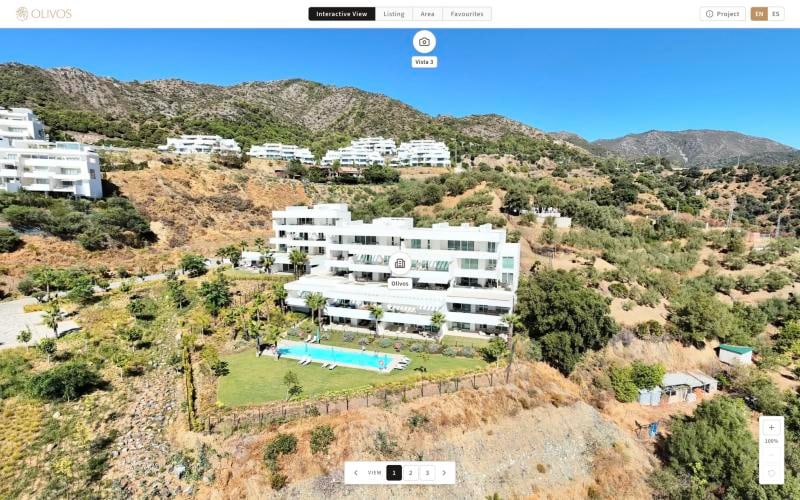
Interactive view of the web model with the buildings marked on the development's aerial image

Public demo

A real web model, live and in use. Filter by price, bedrooms or floor, open a home and look at its floor plan, size and status.

Open the demo ↗

Prefer to look at it in your own time?

We'll send you the information pack: what each format includes, starting prices, lead times and the material we need from you. No call, no commitment.

Two formats, the same content

Most requested

Web model

The link buyers open on their phone, with nothing to install, and explore in full before they set foot in the sales office.

  • Opens by link, on mobile and tablet
  • Can be shared on WhatsApp
  • Reaches overseas buyers
From€4,900

Development with up to four unit types, with a filterable list and a page for each unit.

For closing

Sales office

A large touchscreen in the showroom, with image quality a browser can't match and an instant response even if the wifi drops.

  • Kiosk mode, works offline
  • Finishes that change live
  • Screenshots to send after the visit
From€12,000

Kiosk-mode app built on the content already prepared for the web.

What buyers can do with it

Filter like a property portal

Price, unit type, orientation, floor or availability, on the development itself.

Step inside the home

Floor plan, floor areas, views and specification for that specific unit.

Change the finishes

Material packs on the actual home, with the price alongside.

Tells the truth

Availability comes from the CRM: reserved units stop showing as available.

Shows the surroundings

Distance to the sea, amenities and local landmarks on a map.

Shows what gets viewed

Which units buyers look at and which nobody opens.

When it isn't worth it

In small developments, with few units and a single repeated unit type, the cost doesn't pay back: a good package of renders and well-drawn floor plans works better.

Nor does it make sense if the development is already pre-sold or is being sold as a whole to an investor. The model handles unit-by-unit sales, and if those sales don't exist, it isn't needed.

Compared with what's already used to sell off-plan

The interactive 3D model doesn't replace renders or the physical scale model: it fills the gap both leave when buyers want to see their own home rather than the development in general.

Compared with what's already used to sell off-plan
Interactive 3D modelRenders and floor plansPhysical scale model360 virtual tour
What it showsThe whole development, unit by unitA few rooms, as still imagesThe volume of the scheme, to scaleOne space that's already defined
Where it's usedMobile, web and showroom screenBrochure, portals and social mediaOnly in the on-site sales officeWeb and viewer
Going inside a specific homeYes, any home in the catalogueOnly if it's been renderedNoOnly the one that was captured
Changing finishes and seeing the resultYes, in front of the buyerNoNoNo
Real prices and availabilityYes, from the CRMNoWith pins, by handNo
When the development changesUpdates itselfThe image has to be redoneThe model has to be rebuiltIt has to be captured again
Reaches buyers who can't visitYes, by linkYesNoYes
Provides usage dataYes: which units get viewed and which don'tNoNoBarely

This compares formats, not suppliers. In a small development with a single unit type, a good render package is still the sensible choice.

It fits with what you already have

There's nothing separate to set up. The project material and the catalogue you already manage feed a single base, and both formats come out of it.

What you already have

Project model

BIM, 3D visualisation model or plans

Unit catalogue

Unit types, prices and statuses

CRM

Live availability, read-only

A single base

Content prepared once

Geometry, units and finishes, all in one place

Two ways to show it

Web model

A link, nothing to install. Mobile and tablet.

Sales office

Touchscreen kiosk, running locally, no waiting.

And gives back

Usage data. Which units get viewed and which nobody opens: real demand for your product before you finalise the price list.

When a home is reserved in the CRM, it stops showing as available in both formats.

Lead time

4–6weeks

For the web model of a development with three or four unit types, from the moment we have the material. What extends the timeline is the review rounds, not the production.

What we need from you

  • 01The project model: BIM, 3D visualisation model or plans
  • 02The unit catalogue with unit types, prices and statuses
  • 03The finishes packs you'll be offering
  • 04Read access to the CRM, if you want availability kept in sync

Nothing to prepare from scratch: we work with the project material that already exists.

What you get

  • 01Web version of the development's model, opened by link and optimised for mobile
  • 02Sales office app in kiosk mode for a touchscreen
  • 03Unit type and unit selector connected to the catalogue
  • 04Real-time customisation of materials and finishes packs
  • 05Availability and pricing integrated with the CRM

Frequently asked questions

What's the difference between the web model and the sales office version?

The web version opens in the browser on any phone and is for reaching and qualifying buyers remotely. The sales office version runs on a large touchscreen, reaches much higher image quality and is designed for in-person visits. The content is prepared once and feeds both.

How is it different from a virtual walkthrough or a 360 tour?

A virtual walkthrough shows a finished space. The interactive 3D model shows the whole development, and lets buyers go into a specific unit, change finishes and see real availability. It's for deciding, not just looking.

Does it connect to our CRM?

Yes. Read-only, so units and their statuses come from the system you already use: when a home is reserved or sold, it stops showing as available in the model. If you also want new contacts to go into the CRM, that's integration work and it becomes part of the project.

Do we need the BIM model?

It helps, but it isn't essential. We work with whatever there is: BIM, a 3D visualisation model or plans. What matters is that the geometry comes from the project and not from an interpretation, because what you show is what you later hand over.

Does it work without an internet connection?

The sales office version does: it runs locally so the response is instant, and syncs availability when there's a connection. A wifi outage doesn't leave the salesperson without a tool. The web version needs a connection, like any web page.

How long does it take to have it ready?

Between four and six weeks from when we have the model and the unit catalogue, for the web version of a development with three or four unit types. What extends the timeline is almost never production: it's the review rounds and deciding what can be configured and what can't. The sales office version comes afterwards, built on the content already prepared.

Does it work for selling to overseas buyers?

It's one of the cases where the web version performs best: buyers explore it from their own country before getting on a plane, and arrive at the viewing with a shortlist of units already made.
Does it make sense for your development?

Tell us how many units and types it has and what material you already have. We'll tell you whether it's worth it before we quote anything.

Other services